EN
OrderSign up

For when everything goes down

Works on your computerand your phone.

A complete offline encyclopedia, an offline map with routes and possible shelters, first aid and 20 emergency guides on a single 64 GB stick.

  • No app needed
  • No Wi-Fi needed
  • No internet needed
  • Computer and phoneno app, wifi or internet
  • Offline encyclopedia47 reference works, about 49 GB
  • Map with routesNetherlands and Belgium, 2.5 GB
  • First aid23 lessons with drawings
  • 20 guidesfrom fire to power cut

See how it looks

The real program. Not a mock-up.

This is the program as it runs on the stick. Big buttons, big letters, in plain Dutch. Tap a section to see that part of the demo.

The real risks

This can happen here too.

These are risks that could happen in the Netherlands too. The advice is to keep enough water, food, cash and other essential supplies at home for at least 72 hours.

72 hoursprepared at a minimum, is the advice

Based on the official emergency advice for the Netherlands.

Your emergency kit

You've got water. But no map and no plan.

Water, food and a flashlight are a good start. But if the network goes down, you have no map, no route and no idea what to do first. That is exactly what almost every emergency kit is missing, and exactly what Emergency Stick has.

  • A map with no signal neededThe Netherlands and Belgium offline, with routes and possible shelters.
  • Your own emergency planWho is at home, who needs extra help, which medication and who you can call. Fill it in once.
  • Know what to do20 emergency guides and 23 first-aid lessons, step by step, in plain language.
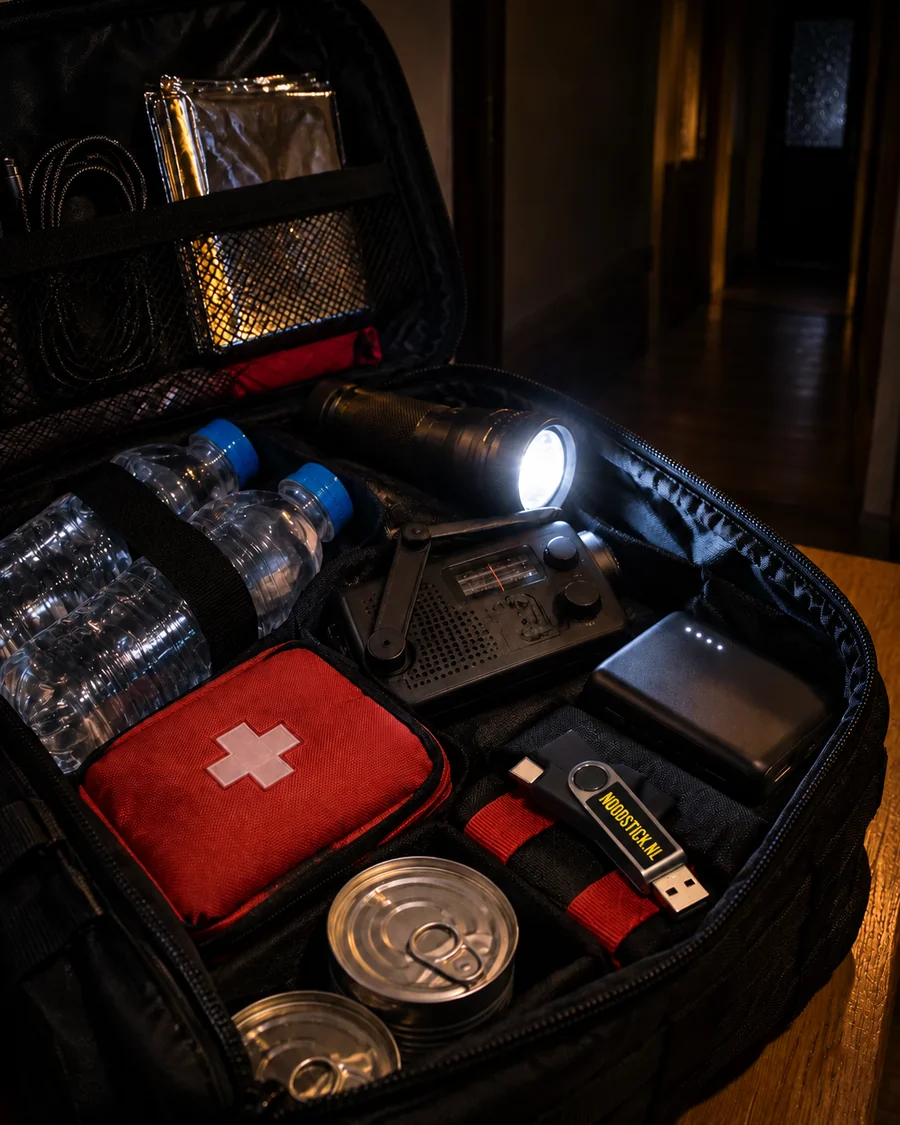
An open emergency kit with water, radio, power bank, first-aid pouch and the Emergency Stick

What's on it

72 hours without power. What do you have at home?

This is what is on the stick: the app, the guides and the first aid in plain Dutch, with large buttons, without internet. The large encyclopedia is mostly in English (see the library).

Look it up, even without internet.

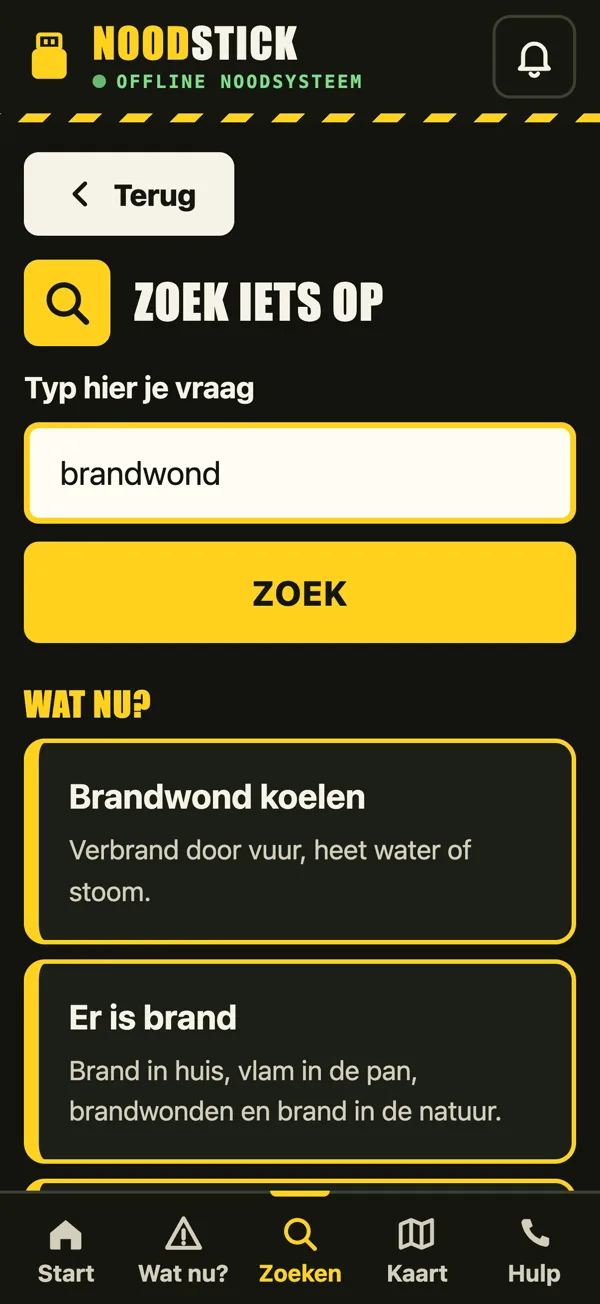
Type what you want to know, for example “burn” or “boiling water”. Emergency Stick searches the guides and the Dutch encyclopedia and shows the answer, with no connection needed.

  • Guides and the Dutch encyclopedia, searchable without internet
  • Big buttons and big letters, for older people and children too
Screenshot of the app: searching for a burn, with the results below

A map with routes, even without internet.

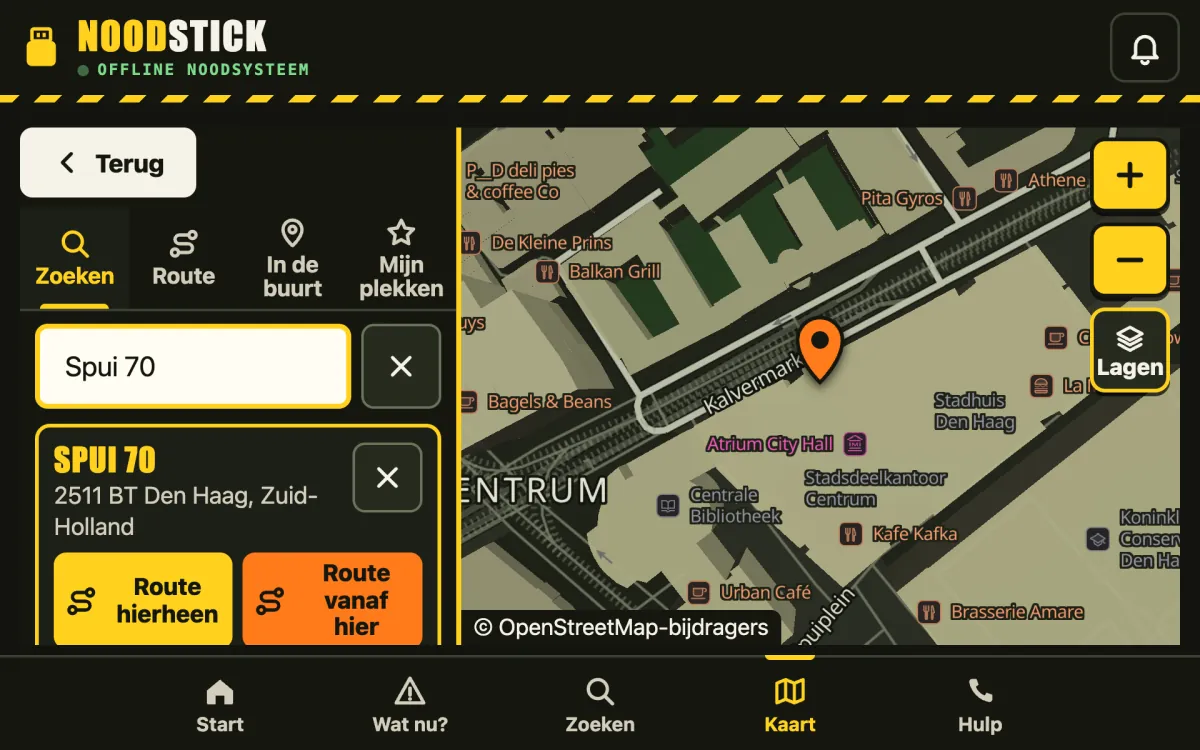
The map is on the stick and works on your computer and your phone, without internet. Search for a place, an address or a postcode, plan a route on foot, by bike or by car, and find what is nearby. You do not need any signal for this.

  • 2.5 GB of map of the Netherlands and Belgium
  • Routes on foot, by bike or by car
  • Help nearby: hospitals, pharmacies, police, fire services, AEDs, drinking water and cash machines
  • Possible shelters: assembly points, old bunkers, sirens and metro stations
  • Search by address or postcode
Screenshot of the app on a laptop: the offline map with a place searched for

A checklist for your emergency kit.

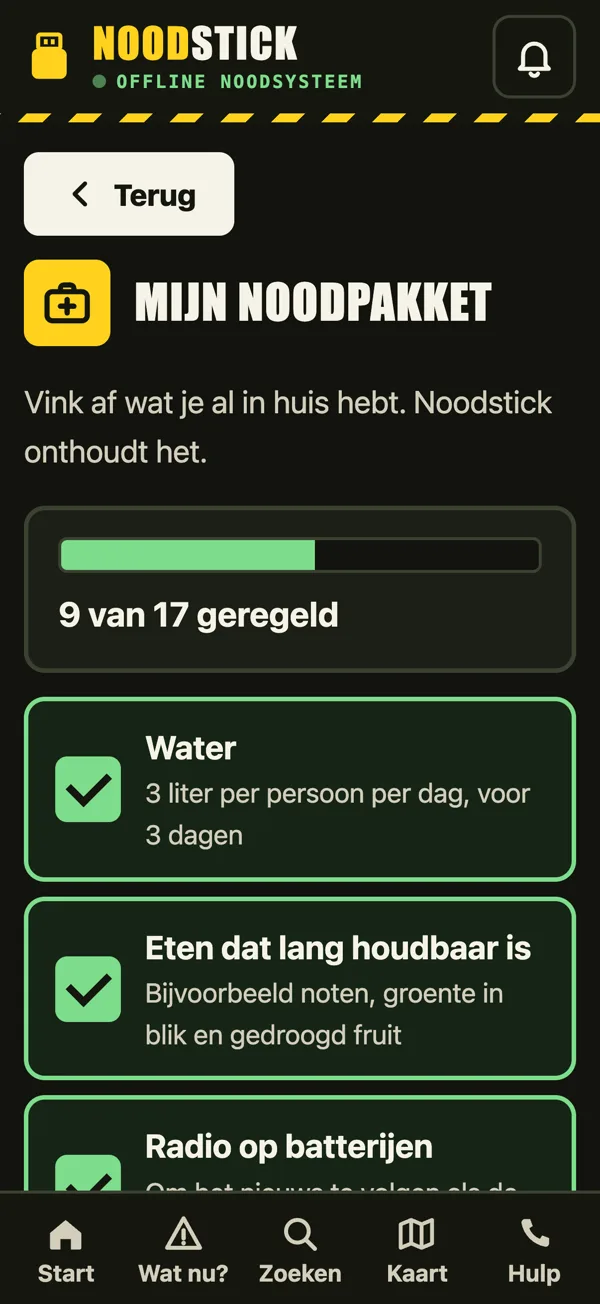
17 items, based on the official emergency advice: from water and food to a whistle and spare keys. Tick off what you already have and see at a glance what is still missing. The calculator tells you how much water and cash your household needs.

  • Tick things off, and your progress is saved on the stick
  • Calculator for water and cash
Screenshot of the app: the emergency kit checklist

Your emergency plan, filled in and printed.

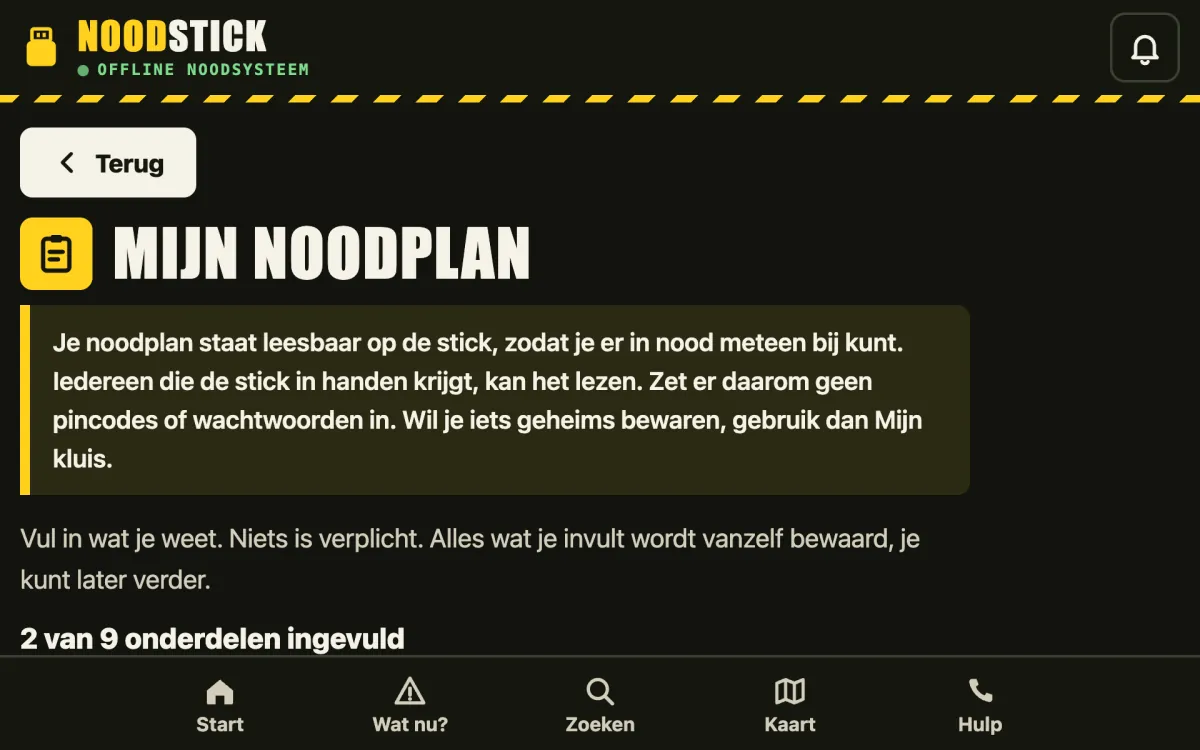
Who lives in the house, where do you meet up, who do you call? You fill it in step by step and print it out. That way you also have the recommended emergency plan on paper.

  • Fill it in step by step
  • Print it out on paper
Screenshot of the app on a laptop: filling in the emergency plan

Also on the stick

  • Translator for 14 languages

    Translate between Dutch and 13 other languages and look up a word or a phrasebook, without internet.

  • First aid, step by step

    23 first aid lessons and 7 lessons for the home, with photos and drawings. With a rhythm button for CPR and a source for every lesson.

  • A safe for your papers

    Keep copies of your passport and other documents, encrypted with a password that you choose.

  • Alerts on the computer

    An alert when the power is back, the battery is almost empty or the internet works again. And an alarm clock.

  • Find my emergency radio station

    Which station your radio should be tuned to, for your region.

  • Phone pack

    The map by province, reference material from the encyclopedia and first aid as PDFs. You open them on your phone or tablet as ordinary files, without an app and without wifi.

The library: 47 reference works, about 49 GB

The whole Dutch encyclopedia with pictures, plus the best of the encyclopedia in English, German, French, Turkish, Polish, Arabic and Ukrainian, and reference material on health, food, water and repairs. Apart from the Dutch encyclopedia, most of the reference material is in English.

  • Encyclopedia in Dutch

    The whole Dutch encyclopedia, complete and with pictures. About 21 GB.

  • Encyclopedia in several languages

    The best of the encyclopedia in English, German, French, Turkish, Polish, Arabic and Ukrainian. The Dutch encyclopedia is complete; the other languages are selections.

  • Health and medicine

    Medical reference and medicine in several languages, with questions and answers about health.

  • Reference for everyday life

    Preserving food, gardening, cooking, DIY, bike and car repair, radio, energy without the grid, and a dictionary.

All 47 reference works

Dutch and reference

  • Encyclopedia in Dutch, with pictures
  • Dictionary
  • Travel guide (Dutch)
  • Travel guide
  • Textbooks and manuals
  • Old Dutch texts

Health

  • Medical reference
  • Questions for medical professionals
  • Healthy exercise and eating
  • Parenting
  • Pet care

Food, water and garden

  • Preserving fruit and vegetables
  • Gardening and growing vegetables
  • Cooking and food storage
  • Sustainable building and living
  • Energy without the grid
  • Frugal and sustainable living

DIY and repairs

  • Knots and ropes
  • Rebuilding civilisation yourself
  • Outdoor survival and camping
  • Ham radio
  • DIY in and around the home
  • Car and motorbike repair
  • Bicycle repair
  • Clever household tips
  • Crafts and handicrafts
  • Woodworking
  • Technology and building

Science

  • Physics
  • Physics: questions and answers
  • Chemistry
  • Chemistry: questions and answers
  • Biology: questions and answers
  • Earth, weather and climate

Other languages

  • Encyclopedia in English: the best
  • Encyclopedia in simple English
  • Encyclopedia in German: the best
  • Encyclopedia in French: the best
  • Encyclopedia in Polish
  • Encyclopedia in Turkish
  • Encyclopedia in Arabic
  • Encyclopedia in Ukrainian
  • Medicine in German
  • Medicine in French
  • Medicine in Arabic
  • Medicine in Ukrainian

For children

  • Children's encyclopedia

47 reference works, about 49 GB in total, on a 64 GB stick. Language split: 5 in Dutch, 32 in English and 10 in six other languages. The Dutch encyclopedia has pictures; the other languages are text selections. Many titles are English-language question-and-answer reference with a Dutch title.

All 20 guides
  • There is a fire
  • I smell gas
  • The siren is sounding
  • 112 is not working
  • Power cut
  • Drinking water
  • Radio and warnings
  • Internet and phone outage
  • Flood
  • Storm and extreme weather
  • Heat
  • Earthquake
  • Nuclear accident and radiation
  • Attack or violence
  • Emergency kit
  • Emergency plan
  • Cash
  • A fire-safe home
  • Medicines, baby and pets
  • Neighbours and people who need extra help

Written in plain Dutch, based on the official emergency advice for the Netherlands.

How it works

Three steps. Even if you're not technical.

  1. 1

    Plug it in

    Put Emergency Stick in the USB port of your computer.

  2. 2

    Open it

    Start the program on the stick. It opens by itself in your usual browser. Nothing is installed.

  3. 3

    Search

    Tap what you want to know and read the answer, without internet.

  • Windows
  • Mac
  • Linux
  • Phone and tablet

On a phone or tablet you open the folder with the map, the reference material and the first aid lessons in your files. No app, no wifi.

Emergency Stick versus gathering it all yourself

When things go wrong, Google is too late.

All the separate parts exist, and they are often free. You just have to find them yourself, download them, put them on your computer and your phone and get them working, before you need them. Would you rather do that yourself? Fine. Emergency Stick is for people who want it ready to go.

Gathering it yourselfEmergency Stick
Encyclopedia offlineFor each language, search for a large file, download it and install a reading program47 reference works are included, with the whole Dutch encyclopedia with pictures
Map without internetFind map files and set up a map programMap of the Netherlands and Belgium, routes, and nearby hospitals and AEDs
On your phoneInstall an app and copy the files to your phone separatelyMap, reference material and first aid as files, with no app
First aidSearch separate websites yourself, which won't be reachable23 lessons with drawings and a source for every lesson
What to doWork out for yourself what to do in a power cut, a gas smell or high water20 guides in plain Dutch
Your papersSet up an encrypted folder yourselfA safe with your own password
Ready to useOnly once everything works, and you check that yourselfPlug in, open, search
PriceFree, apart from your own stick and your own timeComing as soon as the price is known

    The offer

    Emergency Stick

    Works on your computer and your phone. Without an app, without wifi, without internet.

    We will announce the price and delivery date as soon as they are fixed.

    In stock

    • Order before 22:00 on weekdays, shipped the same day
    • Delivery in 1 to 3 working days in the Netherlands and Belgium

    What you get

    1. Offline encyclopediaThe whole Dutch encyclopedia with pictures, plus the best of English, German, French, Turkish, Polish, Arabic and Ukrainian. 47 reference works, about 49 GB, mostly in English outside Dutch.
    2. Offline map of the Netherlands and BelgiumSearch addresses and routes, on foot, by bike or by car. Emergency services and AEDs nearby, plus possible shelters.
    3. First aid23 lessons with steps and drawings, plus a rhythm button for CPR.
    4. Twenty emergency guidesPower cut, gas smell, flooding, heat, drinking water and more.
    5. Translator for 14 languagesTranslate without internet, on your own computer.
    6. Encrypted safeFor copies of your passport, insurance policies and medication list, with a password that you choose.
    7. Emergency plan for your familyFill it in step by step and print it, with Dutch and Belgian phone numbers.
    8. Phone packMap per province and reference material as PDF files. Open them on your phone or tablet, without an app.
    9. Printed instruction bookletIn the box, so you know how to get started.
    • A Emergency Stick USB stick with the program and all the content
    • Two connectors, USB-A and USB-C, under a swivel cap
    • Fits ordinary computers, new laptops, and phones or tablets with USB-C
    • Made for Windows, Mac and Linux, with no installation
    • No subscription, no account, no cloud
    • Worldwide shipping: free to the Netherlands and Belgium, € 14.95 within the EU, € 24.95 outside it
    • 14-day cooling-off period
    • Legal warranty for defects
    • Developed in the Netherlands

    We ship worldwide: free to the Netherlands and Belgium, € 14.95 to the other EU countries and € 24.95 to countries outside the EU.

    Add to cart
    • Secure payment
    • SSL encrypted
    • 14-day cooling-off period
    • Free shipping NL and BE

      Leave your email address and you'll be the first to hear when Emergency Stick is available to order. Signing up costs nothing and commits you to nothing.

      Who makes this

      Developed in the Netherlands.

      The government asks you to prepare. Emergency Stick puts everything you might need to look up on a single stick, so you have it to hand when the internet, power or your phone lets you down. Questions or ideas? Email info@emergencystick.eu.

      Independent

      • Our own productWe wrote our guides and first aid ourselves, in plain Dutch.
      • Everything is on the stickThe encyclopedia, the map, the first aid and the guides are on the stick itself. You need nothing and no one else to open them.
      • Open sources, honestly creditedThe encyclopedia and the map come partly from free, public sources. The licence and source credits are on the stick itself, as they should be.
      • Your data stays yoursEmergency Stick sends nothing on and keeps no records. What you do on the stick stays on the stick.

      Questions

      Good to know.

      What does Emergency Stick cost and when will it be available?

      The price and delivery date are not yet known. Join the waitlist and you'll be the first to hear when Emergency Stick is available to order.

      Does it work on my phone?

      Yes, without an app. Open emergencystick.eu/telefoon once while you have internet, then choose the phone file on the stick. The map, address search, routes and navigation then work on your phone, even without signal. You open the reference works and first aid as files. Searching the whole encyclopedia is only possible on a computer.

      Do I need internet or an app?

      No, never. On a computer you start the program from the stick, without installing anything. On a phone or tablet you open the files without an app.

      What is on Emergency Stick?

      47 reference works, about 49 GB in total: the whole Dutch encyclopedia with pictures, the best of English, German, French, Turkish, Polish, Arabic and Ukrainian, and reference material on health, food, water and repairs (mostly in English outside Dutch). Plus the offline map of the Netherlands and Belgium with routes and possible shelters, first aid, 20 emergency guides, the translator, the vault and the emergency plan. The full list is at The library.

      Do you also ship abroad?

      Yes, we ship worldwide. Shipping is free to the Netherlands and Belgium, € 14.95 to the other EU countries and € 24.95 to countries outside the EU. Outside the EU, import duties, VAT and other charges may be charged to you; these are not included in the price or the shipping costs. You choose your country just above the order button.

      Which payment methods are available?

      Can I return Emergency Stick?

      Yes. You have a 14-day cooling-off period, counted from the day you receive the stick. How it works is explained in the terms. You withdraw using the Withdraw order button at the bottom of every page.

      Will it fit my computer or phone?

      Yes. The stick has two connectors, USB-A and USB-C, under a swivel cap. It fits ordinary computers, new laptops, and phones or tablets with USB-C. On a computer you start the full program. On a phone or tablet you open the map, the reference material and first aid as files.

      Is it a subscription?

      No. No subscription, no account and no cloud.

      Does Emergency Stick work without power?

      The stick itself needs no power, but the computer or phone you plug it into does. So keep a power bank in your emergency kit.

      Which computers does Emergency Stick work on?

      Emergency Stick is made for Windows, Mac and Linux. There is nothing to install.

      My computer asks for confirmation when it starts. Is that normal?

      Yes, that can happen the first time you start it, because the program runs from a stick. The stick explains how to confirm it.

      Is the safe secure?

      The safe encrypts copies of your papers with a password that you choose. Without that password it will not open, not even for us: so remember it well. We do not guarantee unbreakable security: also keep a copy of your papers in another safe place.

      Does Emergency Stick replace a doctor or the emergency services?

      No. Emergency Stick is reference material for when you have to manage on your own for a while. In an emergency, always call 112 if you can.

      What do you do with my email address?

      We only use it to let you know when Emergency Stick is on sale and what it costs. Read more in the privacy statement.

      What do you do with my data?

      Only what is needed for your order and its delivery. Payment goes through the secure payment page; we do not see your card details. Read more in the privacy statement.
      If everything goes down, will you be ready?

      Make sure the answers are there before you need them.

      Order Emergency Stick

      Secure payment via Stripe, SSL encrypted

        In stock

        Sign up and you'll be the first to be told as soon as Emergency Stick is available to order.